Showing posts with label git. Show all posts

Friday, February 17, 2012

Watching all github forks

I like watching what other people do with my code. It often gives me ideas about how to improve the API or what features to add. I can also get a feeling of what the user thinks of my code: if he uses it differently it's an indicator that he either doesn't agree with my design choices (whether they were conscious or not!) or he's struggling to understand some of the concepts, which I may have left implicit or undocumented. In a nutshell: a different perspective.

For code published on github, this is easy to do: just watch the forks. But I always seem to miss some fork, so here's a script that watches all forks in a github network:

You can get your github API token from https://github.com/settings/admin

Going further, I like doing these reviews from gitk. So here's another script that adds all repositories in a network as remotes:

I then run a "git fetch --all" and browse the commits in gitk.

Of course, this works on networks with relatively few forks or not a lot of activity. YMMV.

Sunday, November 21, 2010

Shallow submodules in Git

A git submodule is really little more than an embedded repository with some configuration in the parent repository to track its HEAD. When you first clone the parent repository, you have to manually fetch the submodules by running:

git submodule init
git submodule update

This actually runs a clone (initially) for each submodule. Each submodule is a fully-fledged repository. You can even commit and push from a submodule repository (if you have permissions, of course).

But sometimes you only want submodules for read-only purposes. For example if you have a "superproject" whose purpose is to integrate several projects through submodules. When that's the case, it becomes annoying having to download the entire history for each submodule. It wastes time, bandwidth and disk for everyone that wants to work with this superproject. Shallow clones are great for this, but how can we apply them to submodules?

After asking on stackoverflow, Ryan Graham gave me the hint that "submodule update" can handle previously cloned submodules, so it was just a matter of running a "manual" shallow clone for each submodule between "submodule init" and "submodule update". This script does just that:

Keep in mind that the savings in disk space are usually not quite what you'd expect.

Saturday, May 8, 2010

Git on Virtual ALT.NET Hispano

Last month I did a VAN on Git for the ALT.NET Hispano (Spanish-speaking) community.

Tired of always seeing the same tutorials using the command-line, I decided to mostly use git-gui and gitk instead, making it look less daunting and more visually appealing. I also focused mostly on Git-SVN, even including a demonstration with an actual Google Code SVN repository. Most people use SVN at their dayjobs so explaining git-svn serves a double purpose: it gives them something they can use immediately, and it acts as a gateway drug for the real DVCS.

Then we discussed workflows, which IMHO is the biggest benefit of DVCS and also the most different feature from centralized version control.

I know I never post any content in Spanish, well, this one's going to be an exception ;-)
Here's the recording of the session:

Thanks a lot to Jorge Gamba and the whole ALT.NET Hispano community!

Thursday, March 4, 2010

Stitching git histories

We finally finished migrating the Castle subversion repository to git. When starting the migration we decided that each project under the Castle umbrella would keep all of its history, which meant including the history from when the projects weren't separate and stand-alone but a single humongous project. This was a problem, as git-svn couldn't follow the project split.

I first asked on stackoverflow about this, but didn't get any real solutions. So after a few failed experiments I settled on using grafts and filter-branch. Here's the guide I wrote to migrate each project, I think it could be of help for someone in a similar situation.

I already had run basic git-svn migrations of everything so I'll just skip that step.

First, clone the original-history project from the read-only URL (to prevent accidentally pushing to it)

$ git clone git://github.com/castleproject/castle.git
$ cd castle

Add the recent-history project as a remote (with the private read-write URL) and fetch it:

$ git remote add recent git@github.com:castleproject/Castle.Facilities.ActiveRecordIntegration.git
$ git fetch recent

Launch gitk to see both trees:

$ gitk --all

Press F2 and select remotes/recent/master
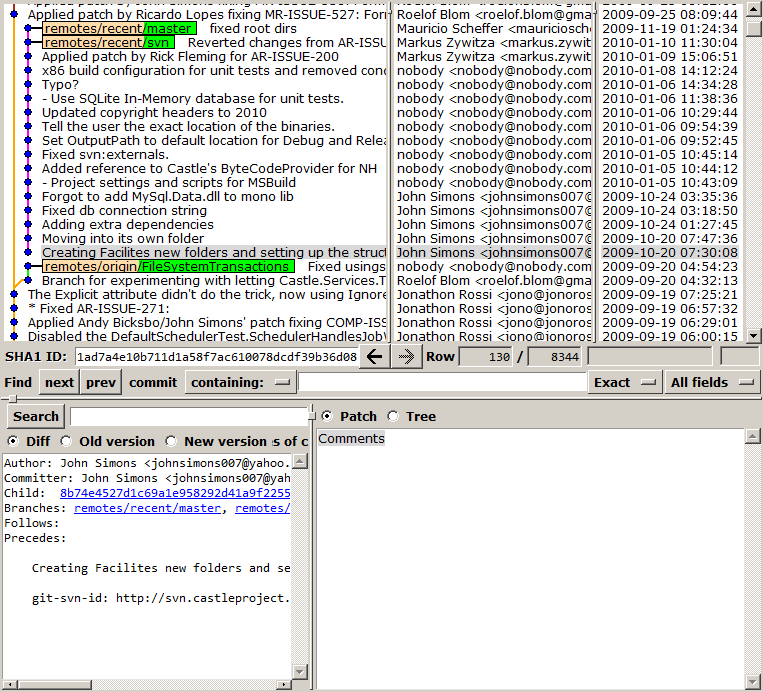
Both histories are unrelated!

Take note of the SHA1 of the first commit in the recent-history (in this case, the one that has the description "Creating Facilites new folders and setting up the structure". The SHA1 of this commit in this case is 1ad7a4e10b711d1a58f7ac610078dcdf39b36d08

Search in gitk the exact commit in the original-history where the project was moved to its own repository. The first commit in recent-history has the date 2009-10-20 07:30:08 so it has to be around that time.
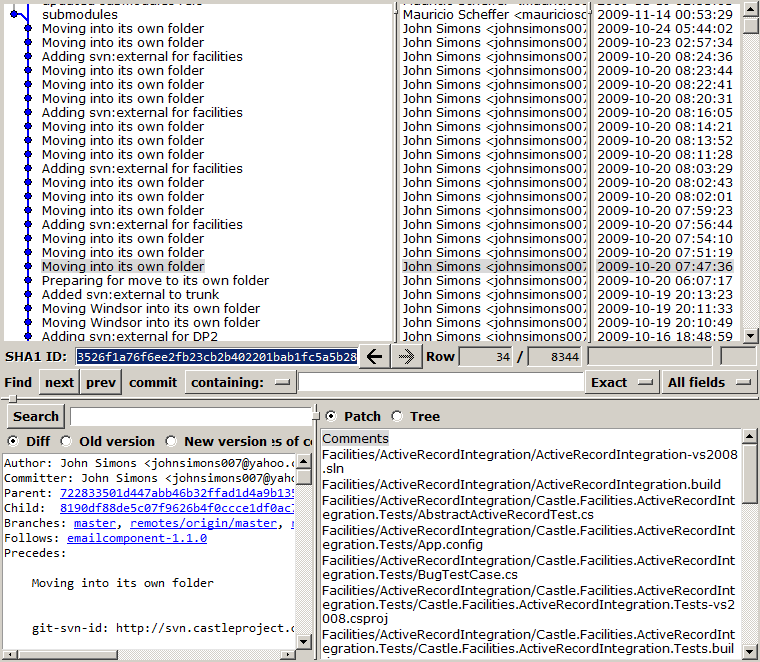
Found it! Take note of the SHA1: 3526f1a76f6ee2fb23cb2b402201bab1fc5a5b28

Now we're going to build the graft point. Create a .git/info/grafts file with the SHA1s we wrote down:

1ad7a4e10b711d1a58f7ac610078dcdf39b36d08 3526f1a76f6ee2fb23cb2b402201bab1fc5a5b28

Note that the format is <child SHA1> <parent SHA1>
Restart gitk, check that both histories are now related:
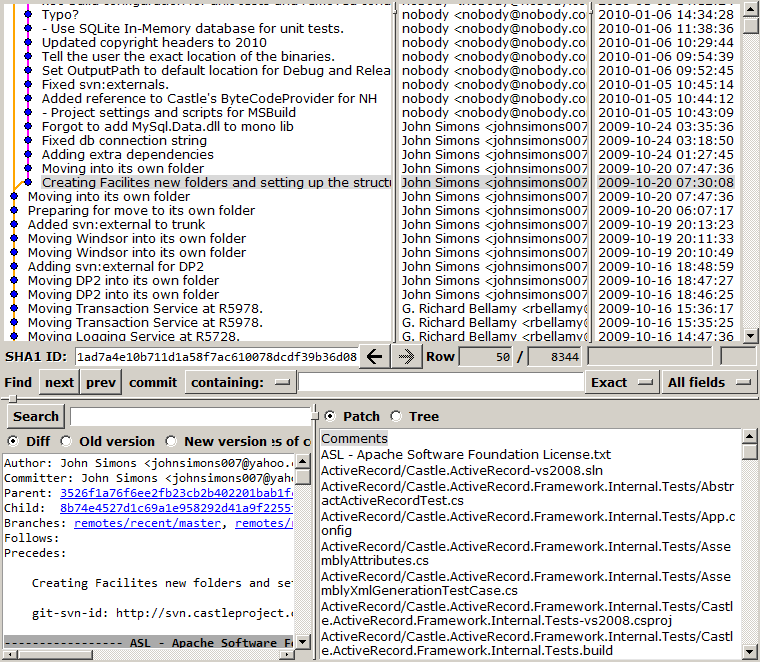
Now let's make this permanent with git-filter-branch. First we locate all branches and tags in recent-history. In this case there are two branches: master and svn, and no tags. Create local branches and tags for each of these:

$ git branch rmaster recent/master
$ git branch rsvn recent/svn

Now we run filter-branch for these heads: </P? $ git filter-branch -- 3526f1a76f6ee2fb23cb2b402201bab1fc5a5b28..rmaster 3526f1a76f6ee2fb23cb2b402201bab1fc5a5b28..rsvn

If it complains about a dirty working copy when running filter-branch, reset and retry.

Refresh gitk, check that everything's OK:
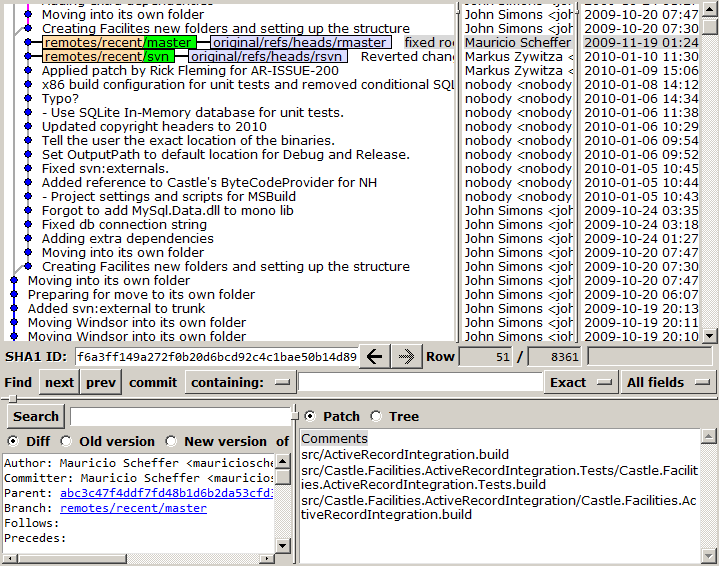
Remove the graft and the original heads:

$ rm -rf .git/info/grafts .git/refs/original

Check gitk again, if everything's OK relocate master:

$ git reset --hard rmaster

The temporary branches can be removed now:

$ git branch -d rmaster rsvn

And finally push:

$ git push -f recent

Note that we need to use the -f (force) flag since we rewrote history.

Check on github that everything looks good. Hmm, there's an outdated svn branch, let's remove it:

$ git push recent :svn

On github, check that the committers are correctly mapped, each commit should be linked to the profile of its author.
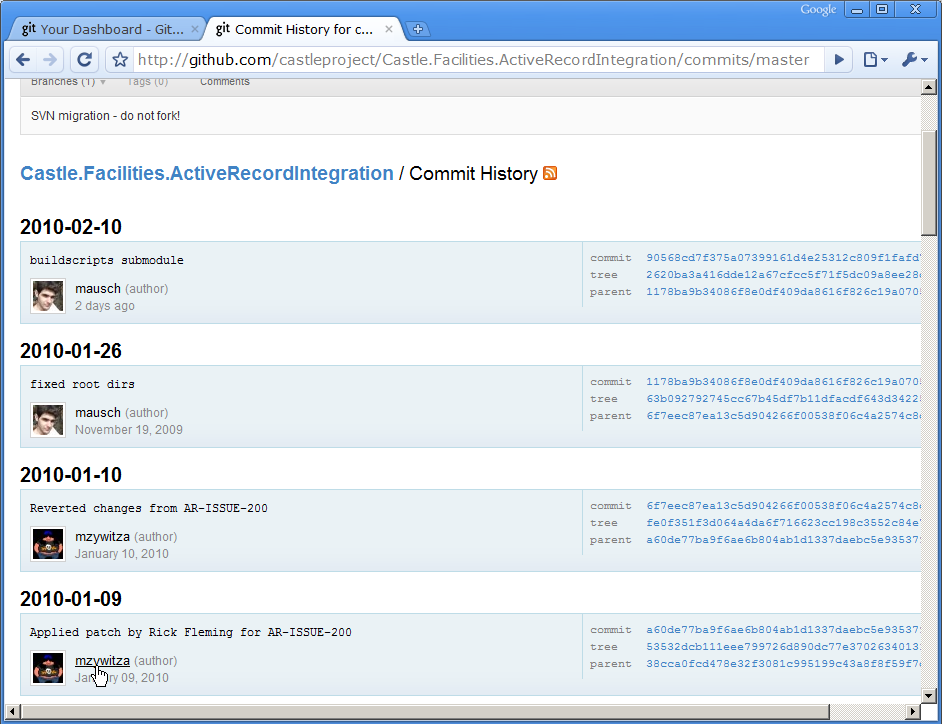
Now add the build scripts as a submodule:

$ git submodule add git://github.com/castleproject/Castle.Buildscripts.git buildscripts

Commit and push. That's it.

Actually, after all of this we decided to avoid submodules and instead copy the build scripts and build tools to make forking easier for everyone.

Also, this guide wasn't applied verbatim for all projects. Some projects were merged into other projects, so these "destination" projects required multiple graft points to merge the other projects' histories.

Sunday, October 18, 2009

Git filter-branch with GitSharp

I'm currently working on migrating the Castle project Subversion repository to git. There are already a couple of svn mirrors on github, but this migration is intended to eventually replace svn as the official repository. With over 6000 commits in 5 years of history, it's not a trivial migration.

One of the issues is that all subprojects are currently being split from the main trunk to make them more independent. I'll leave that for another post.

Another issue is the committer mapping. Each svn username needs to be mapped to a github account (name + email). Roelof Blom kindly provided this map, so I was set to import with git-svn. Two days later git-svn finished and I pushed the repository to github.
Much to my dismay, I found that some committers on my repository weren't matching their github accounts. The Ken Egozi on my repo wasn't the same Ken Egozi on github!

I had two options: either fix the user mappings and re-run git-svn or change the committers with git filter-branch. I went with filter-branch as described in the Pro Git book. It was processing about 1 commit/s so I left it working and went to sleep.

The next morning I went to see and it had segfaulted halfway through. Now that did it. I updated my GitSharp fork and wrote this kind of specific filter-branch:

internal class Program {
    private static void Main(string[] args) {
        var committerMap = new Dictionary<string, string> {
            {"Ken Egozi", "a@b.com"},
            {"Krzysztof Koźmic", "c@d.com"},
        };
        var repo = Repository.Open(args[0]);
        var refs = repo.getAllRefs()
            .Where(x => x.Key.StartsWith("refs/heads") || x.Key.StartsWith("refs/tags"))
            .ToDictionary(x => x.Key, x => x.Value);

        var commitMap = new Dictionary<string, string>();

        foreach (var r in refs) {
            Console.WriteLine("Processing ref {0}", r.Key);
            var startCommit = repo.MapCommit(r.Value.ObjectId);
            var newHead = commitMap.ContainsKey(r.Value.ObjectId.Name) ? 
                repo.MapCommit(commitMap[r.Value.ObjectId.Name]) : 
                Rewrite(repo, startCommit, commitMap, committerMap);
            var newRef = repo.UpdateRef(r.Value.Name);
            newRef.NewObjectId = newHead.CommitId;
            newRef.IsForceUpdate = true;
            newRef.Update();
        }
    }

    public static Commit Rewrite(Repository repo, Commit startCommit, Dictionary<string, string> commitMap, Dictionary<string, string> committerMap) {
        Commit lastCommit = null;
        var walker = new RevWalk(repo);
        walker.sort(RevSort.Strategy.REVERSE);
        walker.markStart(walker.parseCommit(startCommit.CommitId));
        foreach (var rcommit in walker.iterator().AsEnumerable()) {
            var commit = rcommit.AsCommit(walker);
            if (commitMap.ContainsKey(commit.CommitId.Name)) {
                lastCommit = repo.MapCommit(commitMap[commit.CommitId.Name]);
                Console.WriteLine("{0} already visited, skipping", commit.CommitId.Name);
                continue;
            }
            if (committerMap.ContainsKey(commit.Author.Name))
                commit.Author = new PersonIdent(commit.Author.Name, committerMap[commit.Author.Name], commit.Author.When, commit.Author.TimeZoneOffset);
            var newCommit = new Commit(repo) {
                TreeId = commit.TreeId,
                Author = commit.Author,
                Committer = commit.Author,
                Message = commit.Message,
                ParentIds = commit.ParentIds.Select(x => repo.MapCommit(commitMap[x.Name]).CommitId).ToArray(),
            };
            newCommit.Save();
            commitMap[commit.CommitId.Name] = newCommit.CommitId.Name;
            lastCommit = newCommit;
        }
        return lastCommit;
    }
}

It took this little code 3 minutes to rewrite the whole repository. That's 34 commits/s !

When time allows, I'll try and clean this up, then merge it into the new GitSharp.CLI project. Instead of using a bash script to define transformations like the original filter-branch, this could use an embedded Boo or IronPython script!

DISCLAIMER: The code shown here is completely throwaway quality. It does not intend to be a reference GitSharp app or anything like that. It does not intend to be a general filter-branch replacement. It works on my machine, etc. Do not run this code on your repositories unless you know what you're doing. It will rewrite your whole repository! You have been warned.

Sunday, July 19, 2009

The current status of Git on Windows

So I finally hopped on the Git wagon, and I gotta say it's awesome! It takes some learning, but once you grok it, it's quite a simple model really.

I'm currently using Git via git-svn at work at the moment since I don't want to disturb the rest of the team just yet. Git-svn allows me to take most of the advantages of DVCS and when I'm done I commit to svn to publish my changes. Well, I'm not going to do a tutorial here, you can easily find lots of them on the net. I'll just say that if you're considering using a DVCS, go for it. Don't listen to those who say it's more complex or it has many more commands. Just go for it, it takes some learning but it's totally worth it. But please, do it with an open-minded approach. It's a different paradigm, try not to judge it from centralized version control concepts.

In my opinion, within three years from now almost everyone will be using a DVCS. Even the svn team is considering implementing an "hybrid distributed/centralized model" so if you stick with svn you'll probably use decentralized features in a couple of years.

The adoption rate of DVCS is pretty fast. Take a look at these graphs of Git Survey 2008 responses, and GitHub traffic:

 git_survey_responses (1)


And that's just Git. Mercurial and Bazaar usage are growing too.

However, it isn't all roses with Git on Windows. Linux people are used to the command line so it's not much of a problem for them to use the git CLI, but we Windows users are too spoiled by the ubiquitous GUI, and the excellent TortoiseSVN, AnkhSVN and VisualSVN. I think I never had to drop down to the command line to do something in svn. Even when I had to script something that involved svn, I just used SharpSvn and Boo.

With Git, I'm currently using the following mix of interfaces:

  • gitk for history browsing and deleting branches.
  • git-gui or TortoiseGit for committing.
  • TortoiseGit for rebasing and conflict resolution.
  • git-gui for merging, creating branches, pushing, fetching.
  • gitk or git-gui for checkout.
  • GitExtensions for single-file history within Visual Studio.
  • git bash (command line) for git-svn and sometimes pulling, fetching and merging.

There are even more GUIs, like git-cola, qgit and others. So the problem isn't really a lack of GUIs. The problem is that none of them gets everything right, like TortoiseSVN does. Or at least I haven't found one. So I have to keep switching between them, which obviously isn't optimal. Now I don't mean to bash them, to their credit, GUIs and Windows support have improved hugely in the last 12 months or so. In particular, TortoiseGit has gone from nil to very usable in about 6 months by taking advantage of the TortoiseSVN codebase.

Another issue is the speed. Everyone says git is fast. Not so much on Windows, because Windows doesn't have fork() so it has to be emulated (which is slow) and exec() is also much slower than Linux. Git-svn is particularly slow because of this.

Now I don't like to rant aimlessly. I think the way to truly address these issues is to first build a solid foundation, a solid git library for Windows. And that foundation is GitSharp, which is a port of the Java jgit. The port is currently only 50% complete so it needs as much help as possible. Are you interested? Fork away! ;-)