Friday, March 19, 2010

Proxying and parallelizing processes

Some code just flat out refuses to run multi-threaded. Like GeckoFX. It's a great project, and I found it to be much more reliable than WebBrowser (aka IE), but it just won't run multi-threaded (or at least me and several other people haven't figured out how)

I had to write some CPU-intensive, non-interactive code involving GeckoFX, so parallelization was a must. Well, when multi-threading won't fly, multi-processing (as in launching code on a separate process instead of a separate thread) can be a viable alternative. This does complicate RPC a bit but we can tuck this under a proxy that serializes parameters and then gets the return value through a named pipe:

public class ProcessInterceptor : IInterceptor {
    ... 

    public void Intercept(IInvocation invocation) {
        var pipename = Guid.NewGuid().ToString();
        var procArgs = new List<string> {
            Quote(invocation.TargetType.AssemblyQualifiedName),
            Quote(invocation.MethodInvocationTarget.Name),
            pipename,
        };
        procArgs.AddRange(invocation.Arguments.Select(a => Serialize(a)));
        var proc = new Process {
            StartInfo = {
                FileName = "runner.exe",
                Arguments = String.Join(" ", procArgs.ToArray()),
                UseShellExecute = false,
                CreateNoWindow = true,
            }
        };
        using (var pipe = new NamedPipeServerStream(pipename, PipeDirection.In)) {
            proc.Start();
            pipe.WaitForConnection();
            var r = bf.Deserialize(pipe);
            r = r.GetType().GetProperty("Value").GetValue(r, null);
            proc.WaitForExit();
            if (proc.ExitCode == 0) {
                invocation.ReturnValue = r;
            } else {
                var ex = (Exception) r;
                throw new Exception("Error in external process", ex);
            }
        }
    }
}

And that "runner.exe" thing is the host, just a console app that is responsible for deserializing parameters, calling the method, managing exceptions and then send back the return value (if any):

public class Runner { 
    ... 
    public static int Main(string[] args) { 
        var pipename = args[2]; 
        using (var pipe = new NamedPipeClientStream(".", pipename, PipeDirection.Out)) { 
            pipe.Connect(); 
            try { 
                var type = Type.GetType(args[0]); 
                var method = type.GetMethod(args[1]); 
                var instance = Activator.CreateInstance(type); 
                var parameters = args.Skip(3).Select(p => lf.Deserialize(p)).ToArray(); 
                var returnValue = method.Invoke(instance, parameters); 
                bf.Serialize(pipe, new Result { Value = returnValue }); 
                return 0; 
            } catch (Exception e) { 
                bf.Serialize(pipe, new Result { Value = e }); 
                return 1; 
            } 
        } 
    } 
}

And now we can parallelize. Here's a silly example (can't post the actual GeckoFX process, it's proprietary stuff):

public class TargetCode { 
    public virtual int Add(int a, int b) { 
        return a + b; 
    } 
}

[Test] 
public void Parallel() { 
    var generator = new ProxyGenerator(); 
    var t = generator.CreateClassProxy<TargetCode>(new ProcessInterceptor()); 
    var r = Enumerable.Range(0, 100).AsParallel().Sum(i => t.Add(i, i)); 
    Assert.AreEqual(9900, r); 
}

This will launch a separate process for each iteration. On a dual-core CPU, the Task Parallel Library will launch by default at most two threads to run in parallel, so you would have at most two runner.exe instances running at the same time, thus achieving multi-process parallelism.

Now this is not a general solution, it worked for my specific usecase but it has several caveats:

  • Doesn't support generic or overloaded methods (it shouldn't be hard to implement)
  • Target code must be interceptable (virtual, non-sealed, etc)
  • Target code must have parameterless constructor (it shouldn't be hard to lift this restriction)
  • Method parameters are passed through command-line so they can't be very long. (it shouldn't be hard to lift this restriction)
  • Target code should be practically stand-alone since the host won't have the same app.config as it parent, nor any other previous initialization, etc.
  • The target code should be sufficiently long-running to justify the overhead of proxying, reflection, serialization and process launching.

Full code is here.

Friday, March 12, 2010

Low-level SolrNet

I recently got a question about how to handle multi-faceting in SolrNet, a nice feature of Solr that can be very useful to the end-user. eBay uses a kind of multi-faceting interface.
If you know nothing about Solr or SolrNet, read on, this article isn't so much about Solr as API design.

The Solr wiki has an example query with multi-faceting:

q=mainquery&fq=status:public&fq={!tag=dt}doctype:pdf&facet=on&facet.field={!ex=dt}doctype

For those of you that are not into Solr, this is just a regular URL query string that is passed to the Solr endpoint. The final URL looks like this (modulo encoding):

http://localhost:9983/solr/select/?q=mainquery&fq=status:public&fq={!tag=dt}doctype:pdf&facet=on&facet.field={!ex=dt}doctype 

And this is how you represent this query in the SolrNet object model:

var solr = ServiceLocator.Current.GetInstance<ISolrOperations<Document>>(); 
ISolrQueryResults<Document> results = solr.Query("mainquery", new QueryOptions { 
    FilterQueries = new[] { 
        Query.Field("status").Is("public"), 
        new LocalParams {{"tag", "dt"}} + Query.Field("doctype").Is("pdf") 
    }, 
    Facet = new FacetParameters { 
        Queries = new[] { 
            new SolrFacetFieldQuery(new LocalParams {{"ex", "dt"}} + "doctype") 
        } 
    } 
});

We build object models like this one because they're programmable, objects and methods can be programmatically combined to build (or compose) our intention. Like Hibernate's Criteria API.

Opposed to this is the string, and most of the time we hate it because it's opaque, it doesn't have any syntactical meaning within our object-oriented code. It has no programmability, no composability. We use very generic classes to build strings, like StringBuilders or StringWriters, which don't convey any syntactical information about what we're actually doing. If we need to extract information from a string, we have to write a parser, which is not a trivial task. But the string also has its advantages: it's naturally serializable (or should I say already serialized), it can be more readable and more concise. And those are some of the reasons why Hibernate also provides the HQL API. You might be thinking that this dichotomy of objects and strings is really a matter of serialization and deserialization, but I'm talking about human-readable strings here, whereas a serialized format is frequently for machine consumption only.

So if we already know what the query string is, how can we simplify the chunk of code above? Thanks to IoC, we can easily tap into some of SolrNet's "internal" components without worrying about what dependencies they need:

Func<string, string, KeyValuePair<string, string>> kv = (k, v) => new KeyValuePair<string, string>(k, v); 
var connection = ServiceLocator.Current.GetInstance<ISolrConnection>(); 
var xml = connection.Get("/select", new[] { 
    kv("q", "mainquery"), 
    kv("fq", "status:public"), 
    kv("fq", "{!tag=dt}doctype:pdf"), 
    kv("facet", "on"), 
    kv("facet.field", "{!ex=dt}doctype"), 
}); 
var parser = ServiceLocator.Current.GetInstance<ISolrQueryResultParser<Document>>(); 
ISolrQueryResults<Document> results = parser.Parse(xml); 

ISolrConnection is just a wrapper over the HTTP request, we give it the querystring parameters and get Solr's XML response, then we feed the response to the parser component and voilà, we have our results.

And since it's just a regular HTTP request, we can go even lower:

using (var web = new WebClient()) { 
    var xml = web.DownloadString("http://localhost:9983/solr/select/?q=mainquery&fq=status%3Apublic&fq=%7B!tag%3Ddt%7Ddoctype%3Apdf&facet=on&facet.field=%7B!ex%3Ddt%7Ddoctype");
    var parser = ServiceLocator.Current.GetInstance<ISolrQueryResultParser<Document>>(); 
    ISolrQueryResults<Document> results = parser.Parse(xml); 
} 

I'll leave it to you to decide which one to use. Like the choice between HQL and Criteria, sometimes you might prefer one over the other depending on the context. Just keep in mind that these components' interfaces are not as stable as the "really public" documented interfaces, they might have breaking changes more often.

Thursday, March 4, 2010

Stitching git histories

We finally finished migrating the Castle subversion repository to git. When starting the migration we decided that each project under the Castle umbrella would keep all of its history, which meant including the history from when the projects weren't separate and stand-alone but a single humongous project. This was a problem, as git-svn couldn't follow the project split.

I first asked on stackoverflow about this, but didn't get any real solutions. So after a few failed experiments I settled on using grafts and filter-branch. Here's the guide I wrote to migrate each project, I think it could be of help for someone in a similar situation.

I already had run basic git-svn migrations of everything so I'll just skip that step.

First, clone the original-history project from the read-only URL (to prevent accidentally pushing to it)

$ git clone git://github.com/castleproject/castle.git
$ cd castle

Add the recent-history project as a remote (with the private read-write URL) and fetch it:

$ git remote add recent git@github.com:castleproject/Castle.Facilities.ActiveRecordIntegration.git
$ git fetch recent

Launch gitk to see both trees:

$ gitk --all

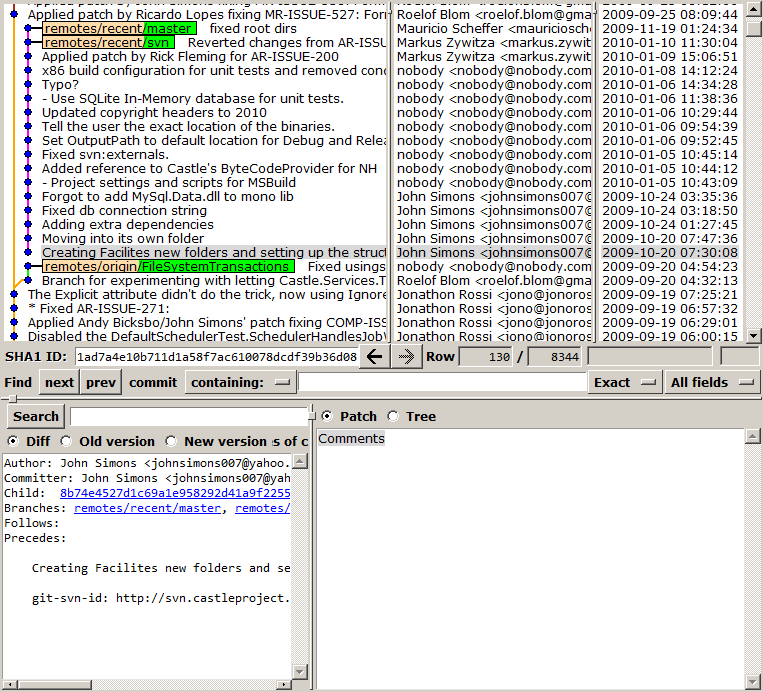
Press F2 and select remotes/recent/master

Both histories are unrelated!

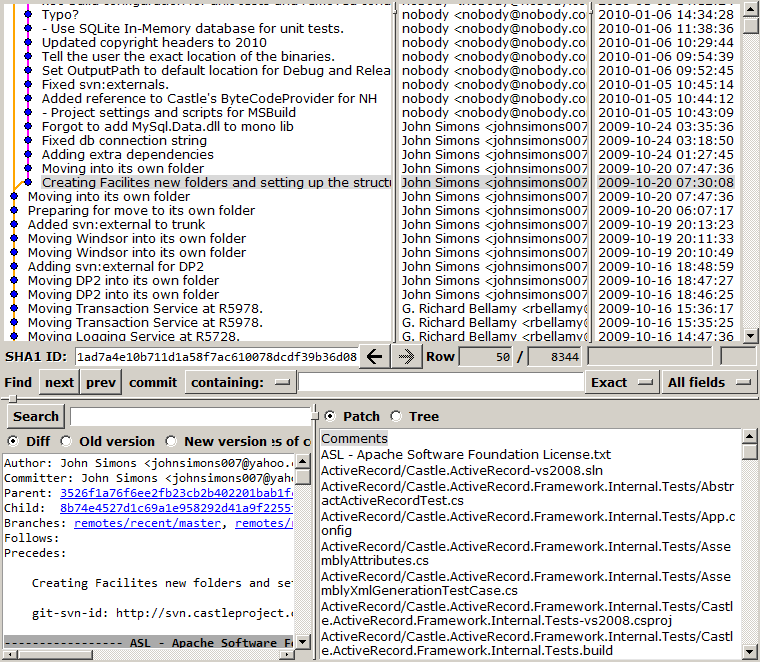
Take note of the SHA1 of the first commit in the recent-history (in this case, the one that has the description "Creating Facilites new folders and setting up the structure". The SHA1 of this commit in this case is 1ad7a4e10b711d1a58f7ac610078dcdf39b36d08

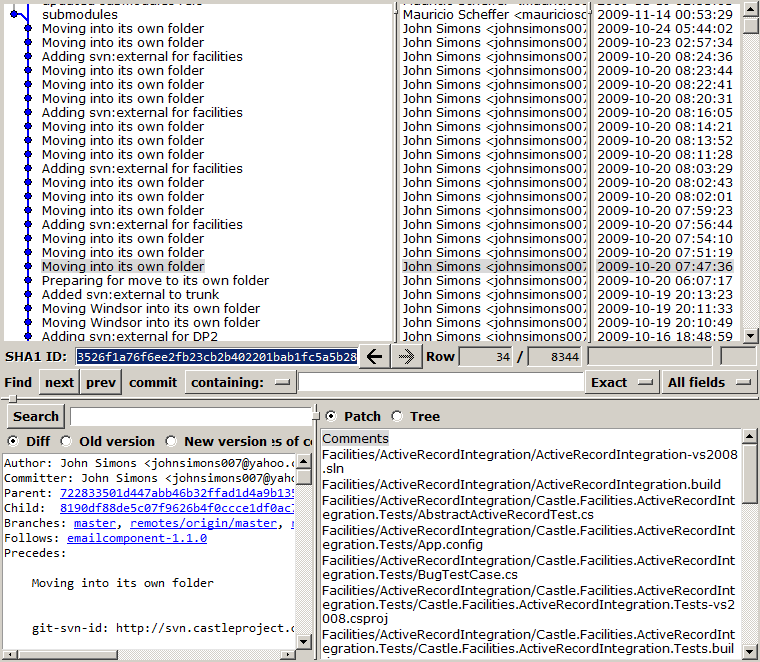
Search in gitk the exact commit in the original-history where the project was moved to its own repository. The first commit in recent-history has the date 2009-10-20 07:30:08 so it has to be around that time.

Found it! Take note of the SHA1: 3526f1a76f6ee2fb23cb2b402201bab1fc5a5b28

Now we're going to build the graft point. Create a .git/info/grafts file with the SHA1s we wrote down:

1ad7a4e10b711d1a58f7ac610078dcdf39b36d08 3526f1a76f6ee2fb23cb2b402201bab1fc5a5b28

Note that the format is <child SHA1> <parent SHA1>
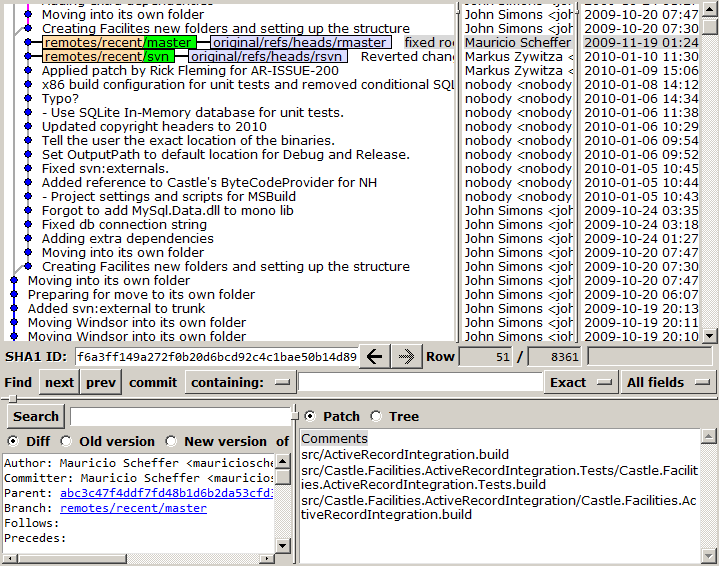
Restart gitk, check that both histories are now related:

Now let's make this permanent with git-filter-branch. First we locate all branches and tags in recent-history. In this case there are two branches: master and svn, and no tags. Create local branches and tags for each of these:

$ git branch rmaster recent/master
$ git branch rsvn recent/svn

Now we run filter-branch for these heads: </P? $ git filter-branch -- 3526f1a76f6ee2fb23cb2b402201bab1fc5a5b28..rmaster 3526f1a76f6ee2fb23cb2b402201bab1fc5a5b28..rsvn

If it complains about a dirty working copy when running filter-branch, reset and retry.

Refresh gitk, check that everything's OK:

Remove the graft and the original heads:

$ rm -rf .git/info/grafts .git/refs/original

Check gitk again, if everything's OK relocate master:

$ git reset --hard rmaster

The temporary branches can be removed now:

$ git branch -d rmaster rsvn

And finally push:

$ git push -f recent

Note that we need to use the -f (force) flag since we rewrote history.

Check on github that everything looks good. Hmm, there's an outdated svn branch, let's remove it:

$ git push recent :svn

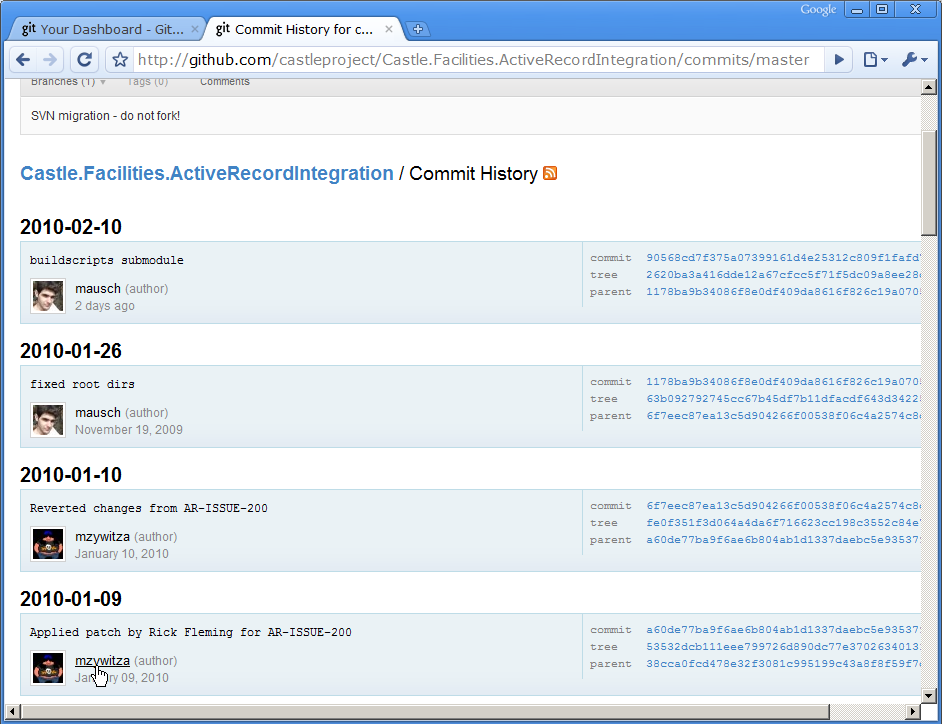
On github, check that the committers are correctly mapped, each commit should be linked to the profile of its author.

Now add the build scripts as a submodule:

$ git submodule add git://github.com/castleproject/Castle.Buildscripts.git buildscripts

Commit and push. That's it.

Actually, after all of this we decided to avoid submodules and instead copy the build scripts and build tools to make forking easier for everyone.

Also, this guide wasn't applied verbatim for all projects. Some projects were merged into other projects, so these "destination" projects required multiple graft points to merge the other projects' histories.

Monday, February 22, 2010

Mobile remote media browser

A couple of months ago I got myself a Motorola Droid (actually a Milestone in my country):

Motorola-milestone-wikipedia2

It's a pretty cool device, with an operating system (Android) that has a lot of potential, but also some warts. There are literally thousands of issues registered in their issue tracker, of which I have starred about 30 of them.

Anyway, I don't mean to write a full review of Android or the Moto Droid, but one thing that bothered me is that I couldn't find any free and easy streaming solution. Some solutions are awfully complicated, and others are way too proprietary for my taste. I just want to select a video file on my desktop computer and have it played on the phone.

So I hacked together a little web app that does just that. The web app sits on the desktop box and presents a filesystem browser. You browse it on your phone, and when you select a video, it opens on the phone's media player. It can also stream MP3, display images and text files and any other content that the phone can handle.


mrmb2mrmb3mrmb4


On a more technical note, video is streamed using VLC to create a RTSP endpoint. The video is transcoded on the fly to H.264 so that Android can understand it, which means that you can stream any video format that VLC supports (even with subtitles!). Too bad I couldn't get on-demand video to work yet (VLC does support it), which is why there's that "Kill VLC" button: when you quit Android's media player, the video keeps running on the server. Also, without on-demand video there's no way to pause or seek from the client. Transcoding settings are configurable so you can fiddle with the bitrate and video resolution (currently set to baseline profile, 500kbit/s, 640x360).

You can get it here:

Only requirement to run is .NET 3.5 SP1.

Wednesday, February 10, 2010

Indexing millions of documents with Solr and SolrNet

When working with Solr, it's not uncommon to see indexes with hundreds of thousands of even millions of documents. Say you build those millions of documents from a RDBMS, which is a common case.

Solr has a tool to do this: the Data Import Handler. It's configurable with XML, like so many things in Java. Problem is, when you need to do some complex processing, it quickly turns into executable XML, and nobody likes that. More importantly, the process is not testable: you can't run a unit test that doesn't involve the actual database and the actual Solr instance. So I prefer to import data to Solr with code. More precisely: .NET code, using SolrNet.

Since adding documents one by one would be terribly inefficient (1000000 documents would mean 1000000 HTTP requests), SolrNet has a specific method to add documents in batch: Add(IEnumerable<T> documents). Let's try adding a huge amount of documents with this.

Setup

To keep this post focused, I'll abstract away the database. So, first thing I'll do is set up some fake documents [1]:

string text = new string('x', 1000); 
IEnumerable<Dictionary<string, object>> docs = Enumerable.Range(0, 150000)
    .Select(i => new Dictionary<string, object> { 
        {"id", i.ToString()}, 
        {"title", text} 
    }); 

This sets up 150000 documents, each one with a size of about 1 KB, lazily. They don't exist anywhere yet, until we start enumerating docs.

Tests

After setting up SolrNet we call:

solr.Add(docs);

and shortly after executing it the process grows its memory usage to some gigabytes and then crashes with an OutOfMemoryException. Holy crap![2]

Reducing the amount of documents to 100000 completed the process successfully, but it took 32s (3125 docs/s) and the peak memory usage was 850MB.  This clearly isn't working!

What happened is that SolrNet tried to fit all the documents in a single HTTP request. Not very smart, eh? But that's out of SolrNet's scope, at least for now. What we need to do is feed it with manageable chunks of documents. So we grab a partition function like this one, courtesy of Jon Skeet[3]. Armed with this function we partition the 100000 docs into chunks of 1000 docs:

foreach (var group in Partition(docs, 1000))
   solr.Add(group);

This completes in 34s which is slightly worse than without grouping, but memory usage is pretty constant at 50MB. Now we're getting somewhere!

But wait! What if we parallelize these groups? The Task Parallel Library (TPL)[4] makes it very easy to do so:

Parallel.ForEach(Partition(docs, 1000), group => solr.Add(group));

This one took 21.2s to complete on my dual-core CPU but peak memory usage was 140MB since it has to keep several groups in memory simultaneously. This is pretty much what SolrJ (the Java Solr client) does with its StreamingUpdateSolrServer, except the Java folks had to manually queue and manage the threads, while we can just leverage the TPL in a single line of code.

Playing a bit with the group size I ended up with these charts of memory size and throughput:

solr-mem

solr-throughput


Memory size seems to increase linearly with group size, while throughput shows an asymptotic growth.

By now I bet you must be saying: "Hey, wait a minute! The title of the post promised millions of documents but you only show us a mere 100000! Where's the rest of it?!?". Well, I did benchmark a million documents as well, and with group size = 1000, in parallel, it took 3:57 minutes. For these tests I used 100000 documents instead to keep times down.

Conclusion and final notes

In this experiment I left a lot of variables fixed: document size, network throughput and latency (I used a local Solr instance so there is no network), CPU (since I ran Solr on the same box as the tests, they competed for CPU)... With a quad-core CPU I would expect this to consume more memory but it would also be faster. Bigger documents would also increase memory usage and make the whole process more network-sensitive. Is memory more important to you than throughput? Then you would use the non-parallel approach. So I prefer to leave these things out of SolrNet's scope for now. It depends too much on the structure of your particular data and setup to just pick some default values. And I don't want to take a dependency on the TPL yet.

Some general advice:

  • Keep your process as linear (O(n)) and as lazy as possible.
  • While increasing the group size can increase the throughput (and memory), also keep in mind that with big groups you'll start to see timeouts from Solr.
  • When fetching data from the database, always do it with a forward-only enumerator, like a IDataReader or a LINQ2SQL enumerable. Loading the whole resultset in a List or DataTable will simply kill your memory and performance.
  • It can also make sense to fetch the data from the database in several groups (I just assumed a single IEnumerable as an origin to keep it simple) and parallelize on that.

Footnotes:

  1. Dictionary documents for SolrNet is implemented in trunk, it will be included in the next release
  2. I know that even though this approach isn't scalable at all, it shouldn't throw OOM with only 150000 docs.
  3. I chose that particular Partition() function because it's one-pass. If you write a partitioning function with LINQ's groupby you'll traverse your IEnumerable (at least) twice. If you use a forward-only enumerable (e.g. LINQ2SQL), which I recommend, you only get to enumerate the result once.
  4. You can get the latest version of the TPL for .NET 3.5 SP1 from the Reactive Extensions.